What Is Incognito Mode? What It Hides and How to Turn It Off
What is incognito mode? See what it hides, what it doesn’t (your IP, your employer, your ISP) and how to turn it on or off on any device.

Incognito mode is a private browser window that doesn’t keep your browsing history, most cookies, or form entries after you close the private session. It helps hide your activity from other people using the same device, but it doesn’t hide you from websites, your workplace, or your internet provider.
It’s handy for gift shopping or a shared laptop. This guide covers what it hides and how to turn it on or off on any device.
TL;DR
- Incognito keeps your private session out of your browser’s normal history after you close it.
- Websites, your workplace and your internet provider may still see activity. Your IP stays visible.
- To end a private session, close every private window or tab.
What is incognito mode?
Incognito is a way to browse without adding sites to your regular browser history. Open a private window, do what you need, close it. When that session ends, the browser throws away its temporary cookies and site data.
It’s like a notebook that erases your pencil marks when you close it. Someone looking later won’t see them. Someone who watched you write still knows what happened.
Cookies are small bits of data that websites put in your browser, for example to keep you signed in or remember your shopping cart. In a private window they’re temporary: they work while you browse and disappear when the session ends.
The name changes by browser, but the basic idea is similar:
| Browser | What it’s called | What to look for |
|---|---|---|
| Google Chrome | Incognito | Hat-and-glasses symbol |
| Apple Safari | Private Browsing | A dark address bar or Private tabs |
| Mozilla Firefox | Private Window | Purple mask symbol |
| Microsoft Edge | InPrivate | InPrivate label |
You can keep a normal window open beside a private one.
What incognito mode hides — and what it doesn’t
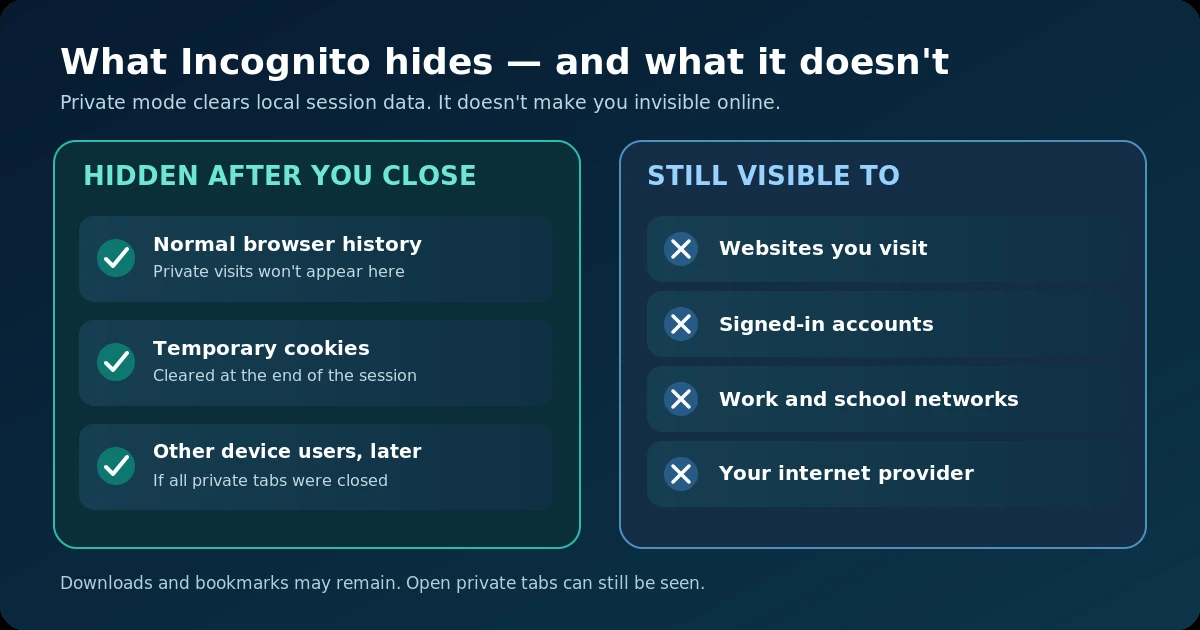
Incognito helps with local privacy: what someone sees in your browser after you finish. It doesn’t make you unknown online.
| Who or what? | Does incognito hide your activity? | What to know |
|---|---|---|
| Someone who checks your browser history later | Usually yes | The private session won’t appear in normal history once it’s closed. |
| Someone using your device while your private tabs are still open | No | They can still see the open pages unless the tabs are closed or locked. |
| Websites you visit, including Google | No | A site can see your visit, and accounts you sign into can link it to you. |
| Your employer or school on its network | No | Network tools may record the sites you connect to. |
| Your internet provider (the company you pay for internet) | No | It may see connection details and the services you use, though encryption limits what it can read. |
| Your browser’s normal history after the session ends | Yes | Chrome and other browsers don’t keep that session’s visited-page list. |
What gets cleared? The private session’s history, temporary cookies, and many form entries go away when it ends.
What stays? Downloads and saved bookmarks, so a hotel receipt you download won’t vanish. Private tabs you leave open are also visible to anyone who picks up the device.
If you sign into Google in Incognito, your searches may be tied to your account, depending on its activity settings. Private mode doesn’t hide a login.
It doesn’t hide your IP address, the network address sites use to reach you. Safari has extra tracker protection, but Private Browsing isn’t a VPN.
In a University of Chicago study of 460 people, more than half wrongly thought Google couldn’t log searches made while signed into Google in private mode. Another 27% thought it stopped viruses. It doesn’t.
In April 2024, Google agreed to delete or change billions of browsing records and update Incognito notices in the Brown v. Google case. The agreement included no class payout. Reuters covered the deal.
When incognito mode is actually useful
Incognito helps in a few everyday cases.
Shopping for a surprise. A private window keeps gift searches out of normal browser history. Order emails and shopping account history can still give it away.
Using a shared computer. A private window leaves less behind on a family laptop. Avoid signing into sensitive accounts on public or hotel computers if possible; the machine itself may be unsafe.
Opening a second account. Sign into a second email account without logging out of the one in your normal window.
Checking a website as a visitor. Private mode starts without your usual cookies, so you can see a page without an existing login. Websites still see your connection.
Should incognito mode be on or off? Use it when you don’t want local history saved. Use normal mode when you want logins and history kept.
It won’t help you hide visits from an employer’s work Wi-Fi, your internet provider, or the sites themselves.
How to turn on incognito mode
On a computer, you’ll find the option in the browser menu, usually at the top right. The keyboard shortcut is often even faster.
| Browser and device | Menu path | Shortcut |
|---|---|---|
| Chrome on Windows | ⋮ → New Incognito window | Ctrl + Shift + N |
| Chrome on Mac | ⋮ → New Incognito window | ⌘ + Shift + N |
| Safari on Mac | File → New Private Window | ⌘ + Shift + N |
| Edge on Windows | … → New InPrivate window | Ctrl + Shift + N |
| Firefox on Windows | ☰ → New private window | Ctrl + Shift + P |
| Firefox on Mac | ☰ → New private window | ⌘ + Shift + P |
To go incognito on Mac, use the Chrome or Safari row above.
Safari on iPhone
- Open Safari.
- Tap the Tabs button. Depending on your layout, you may need to open All Tabs first.
- Swipe right along the tab groups until you reach Private.
- Tap Unlock if your iPhone asks, then open a private tab.
The layout can vary. You may need Face ID or your passcode to unlock private tabs.
Chrome on iPhone
- Open Chrome.
- Tap More (⋯).
- Tap New Incognito Tab.
Chrome on Android
- Open Chrome.
- Tap More (⋮).
- Tap New Incognito tab.
A darker tab and the Incognito symbol tell you you’re browsing privately. If you can’t find the option, the device or account may have a family or workplace rule that blocks it.
How to turn off incognito mode
To turn off incognito mode for a session, close its private windows or tabs.
Chrome, Edge, Firefox, and Safari on a computer
- Go to the private window.
- Close it with the window’s Close button.
- Close any other private windows that are still open.
- Open a normal browser window if you want to keep browsing.
In Chrome, the Incognito session ends only when all Incognito windows are closed. Closing a single tab isn’t enough if other Incognito windows are open.
Safari on iPhone: how to get out of incognito mode
- Open Safari.
- Tap Tabs.
- Swipe left from the Private group to a regular tab group.
- Open a normal tab.
This gets you out of the private view, but it may leave your private tabs open and locked. If you want to end those visits, return to Private and close each private tab as well.
Chrome on iPhone
- Tap Switch tabs.
- Open the Incognito tab group.
- Tap Edit.
- Choose Close All Tabs.
Chrome on Android
- Tap Switch tabs.
- Select Incognito tabs.
- Tap More (⋮).
- Select Close all Incognito tabs.
Switching tabs doesn’t always end a private session. Close it when you’re done.
How to disable incognito mode for good
Advanced: for parents and device admins. To block Incognito rather than close a session, you need a device or browser rule.
Windows: disable Chrome Incognito
- Sign in with an administrator account.
- Open Command Prompt as administrator.
- Run this command:
reg add "HKLM\SOFTWARE\Policies\Google\Chrome" /v IncognitoModeAvailability /t REG_DWORD /d 1 /f- Restart Chrome.
- Visit
chrome://policyand check forIncognitoModeAvailabilitywith a value of1.
Only do this on a PC you manage. 1 disables Incognito; 0 allows it; 2 forces it.
Mac: disable Chrome Incognito
- Open Terminal on a Mac you manage.
- Enter
defaults write com.google.Chrome IncognitoModeAvailability -integer 1. - Restart Chrome.
- Open
chrome://policyand check whether the rule is shown and active.
This is a local test, not a reliable rule for every Mac. Schools and businesses should use managed Chrome policies.
iPhone: limit Safari Private Browsing
- Open Settings → Screen Time.
- Choose the child you’re managing, if needed.
- Open Content & Privacy Restrictions and enable it.
- Tap App Store, Media, Web, & Games → Web Content.
- Choose Limit Adult Websites.
On some iPhones, this also removes Safari’s Private option. It’s a web filter, though, not a dedicated Private Browsing switch, so test it on the phone you’re setting up: some normal sites may get blocked too.
Android: manage a child’s Chrome use
Chrome blocks Incognito when a child is signed in with a Family Link-managed account. Family Link doesn’t block every other browser.
Someone with an admin password or Screen Time code may get around these rules. Other browsers may still work.
Incognito vs VPN vs proxy: what to use instead
A virtual private network (VPN) sends traffic through another server and encrypts the connection to it. A proxy routes traffic through another server, often for one app. They work differently from Incognito.
| Feature | Incognito | VPN | Proxy |
|---|---|---|---|
| Keeps a private session out of normal browser history | Yes | No, not by itself | No |
| Hides your usual IP address from websites | No | Usually yes | For traffic sent through it |
| Hides the sites you visit from your internet provider | No | Usually, inside the VPN connection | Not reliably |
| Typical cost | Free | Free or paid | Free or paid |
| Best use | Shared-device privacy | More privacy for your connection | Changing the IP used by one app or task |
A VPN can’t hide who you are after you log in, and you need to trust its provider. A proxy may not encrypt your traffic.
Key points to remember
Incognito mode is useful, as long as you know its limits. It helps keep visits out of your browser history after you close the private session. It won’t hide your IP address or make you unknown to websites. And turning it off usually means closing all the private tabs or windows, not hunting through settings.
Use it for everyday things like gift shopping and signing into a second account. If you’re using a shared device, close the private tabs and remember that downloaded files may still be there.
If you also want privacy from your internet provider and websites, see our VPN reviews or compare affordable VPNs before choosing one.
Frequently asked questions
Is incognito mode 100% private?
No. It mainly limits what your browser saves on your device, while websites and network operators can still collect information about your visit. And it won’t protect a computer that already has spyware on it.
Does incognito mode hide my IP address?
No. A website will generally still see your connection’s IP address. A VPN or a proxy can replace the IP seen by sites for the traffic that goes through it. Read our guide to IP addresses.
Can my parents or my employer see my incognito history?
They won’t usually find it in your normal browser history after you’ve closed the private session. But parents with device monitoring tools and employers running a work network may still see some activity. Incognito doesn’t switch those tools off.
Can incognito history be recovered?
The browser clears private history at the end of a session. But sites, accounts, network tools and downloaded files may still hold records.
Why would someone use incognito?
To shop for a surprise on a shared laptop, open a second account, or check a site without old cookies. It’s a simple way to leave less history in your browser once you’re done.
Is incognito the same as a VPN?
No. Incognito keeps local browser history out of sight. A VPN changes the IP websites see and encrypts the link between your device and the VPN server. You can use both at once.