Residential proxies use IP addresses assigned to real users’ devices. They simulate normal user traffic and often perform better than datacenter IPs, which are usually detected by strict anti-bot systems. Residential proxies are especially beneficial for accurate web scraping and precise geotargeting. The main advantage of residential proxies is that the websites you need to access recognize them as regular users, not as server traffic.
In the next sections, we will analyze the best residential proxy providers in 2026, in particular DataImpulse, Bright Data, Oxylabs, Decodo and Webshare, and compare them according to specific parameters.
Comparison table
| Provider | Best for | Pool | From (per GB) | Ease of use |
|---|---|---|---|---|
| DataImpulse | Overall value | 90M+ | $1/GB | Excellent |
| Bright Data | Enterprise teams | 400M+ | $8 ($4 with promo) | Moderate |
| Oxylabs | Performance | 175M+ | ~$2.50–$6 | Moderate |
| Decodo | Value | 115M+ | ~$2–$4 | Excellent |
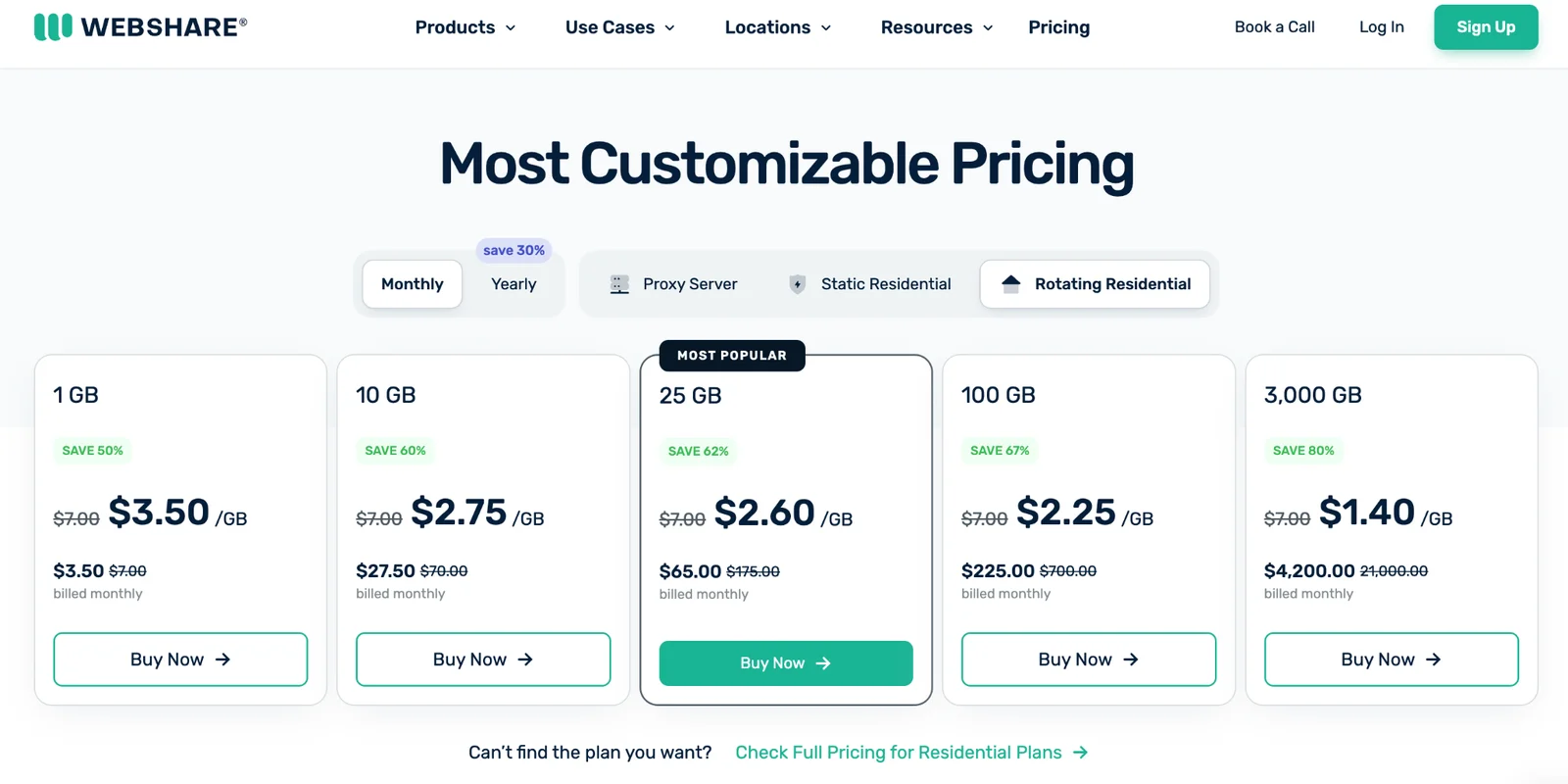
| Webshare | Budget | 80M+ | from $3.50/GB | Excellent |
Prices were checked on the providers’ official websites in October 2026.
How we ranked
To guarantee consistent and accurate residential proxy provider comparisons, we evaluated each company according to five main criteria. The table below reflects how much each factor affects the practical value of a proxy for a wide range of users, from web scraping and SEO to automation and geo-dependent content.
| Criterion | Weight | What we evaluate |
|---|---|---|
| Value for money | 30% | Price per GB, tariff model, traffic conditions, and how many opportunities users get for their money. |
| Network quality & Reliability | 25% | Pool size and number of locations, IP availability, connection stability, uptime, protocols, and targeting options. |
| Real-world performance | 20% | Success rate, latency, speed, session stability. |
| Ease of use & Onboarding | 15% | Ease of configuration, documentation, API, dashboard, support. |
| Ethics & Compliance | 10% | IP source, transparency, privacy, and public compliance certifications. |
Why have we decided to include this comparison?
Many users consider the size of the residential pool a critical criterion, but in fact, it does not determine the position of the provider in the rating. A large number of IPs can be an advantage, but it only matters along with network quality, actual performance, price, usability, and other criteria. The best rotating residential proxies offer a good balance between these factors.
The methodology, criteria, and their weights are given directly on the page so that the reader can understand how the rating is formed and why individual factors have a greater or lesser influence on the final result.
Provider-by-provider
Next, we will analyze each provider separately. We will look at the size and geography of the residential network, prices, productivity, targeting capabilities, and ease of use. We will also briefly note the main advantages and limitations of each residential proxy service.
#1 DataImpulse — Best overall residential proxy
Why it makes the list
- Pool size (claimed)
- 90M+ first-party residential, 20M+ datacenter, 16M+ mobile
- Residential price
- $1/GB
- Targeting
- Country-level free; city / state / ZIP / ASN as paid add-on (~2×)
- Success rate
- ~99.3–99.51% (published / independently noted)
DataImpulse ranks as the best residential proxy provider because of the combination of price, network quality, and ease of setup. Their residential proxies cost $1 per GB on a pay-as-you-go model, and the purchased traffic never expires. The provider uses its own first-party pool with 90M+ ethically sourced residential IPs in 195 countries, supports HTTP(S) and SOCKS5, and offers rotating and sticky sessions.
Pros
- Low starting price
- Non-expiring traffic
- First-party residential pool with user consent
- No subscription required
- Free country targeting
- 24/7 support from real people
- Proxyway honored DataImpulse with Newcomer of the Year and Greatest Progress awards
Cons
- The depth of the residential pool in individual Tier-3 geos, in particular in parts of Africa and Central Asia, may be smaller than in the largest networks, Bright Data and Oxylabs
- City, state, ZIP, and ASN geotargeting options are paid extra
DataImpulse is an affordable option for users who need a residential IP without a monthly subscription. One of the lowest prices, traffic that never expires, its own ethically sourced pool, sufficient geographic coverage, and simple onboarding give it the highest overall value.
Key features:
- 90M+ first-party residential IPs; the provider does not resell the networks of other providers;
- 195+ countries; country targeting is included in the base price; city, state, ZIP, and ASN targeting are available for an extra cost (2x);
- $1/GB pay-as-you-go with no subscription; never-expiring traffic;
- HTTP(S) and SOCKS5;
- 99.51% success rate; response time is about 1 second according to the provider;
- 24/7 real human support via chat and email;
- Integrations with Scrapy, Selenium, Puppeteer, Octoparse, and other tools.
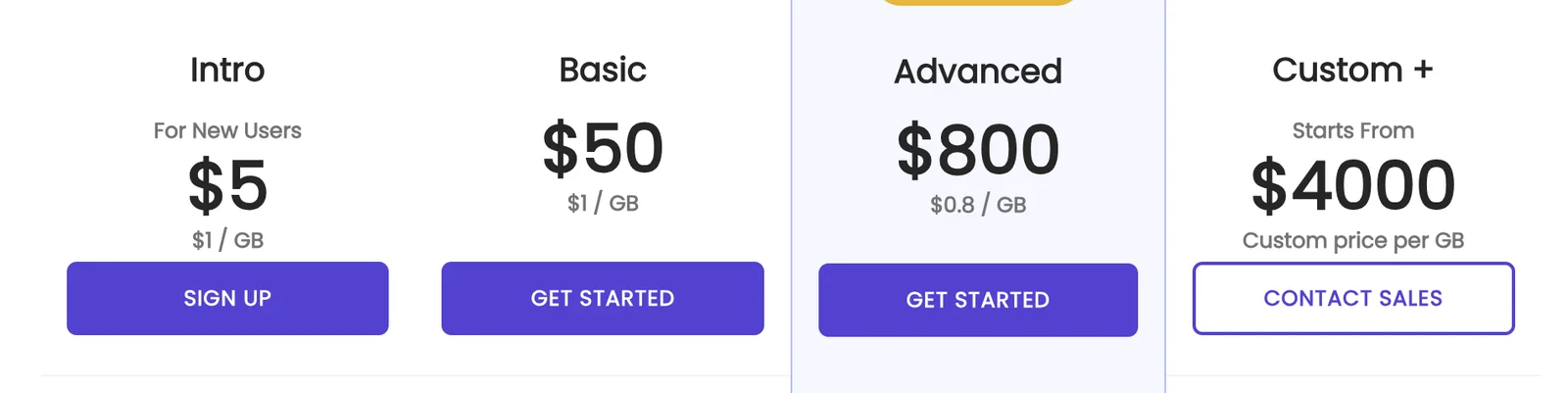
Pricing: pay-as-you-go, $1 per GB; if you get more than 1 TB of traffic, the price is $0.8 per GB, and in case of 5TB+ plans, users can have a custom price.
Read our full DataImpulse residential proxy review.
#2 Bright Data — Best enterprise proxy network
Bright Data
Enterprise data teams, hard-target scraping, compliance-heavy buyersWhy it makes the list
- Pool size (claimed)
- 400M+ residential; 1.3M+ datacenter; 1.3M+ ISP; 7M+ mobile (legacy)
- Residential price
- $8/GB ($4 promo)
- Targeting
- Country, state, city, ZIP, ASN, carrier
- Success rate
- Up to 98.96% residential (global)
Bright Data has one of the largest residential networks of 400M+ residential IPs in 195 countries, with targeting by country, state, city, and ZIP code. The provider also offers enterprise tools such as a free Proxy Manager and Web Unlocker, and its compliance framework includes ISO 27001 and SOC 2 Type II.
Pros
- One of the largest residential pools
- Very granular geo-targeting
- A strong set of tools for enterprise scraping and data collection
- Web Unlocker
- Developed compliance and security infrastructure
- 24/7 support and dedicated account managers for eligible customers
Cons
- More expensive than others
- Residential PAYG currently costs $8/GB at the standard price
- KYC is required to access the residential network
- More complex setup
Bright Data is a good option for large enterprise tasks and complex goals, where you need network scale, geotargeting accuracy, stability, and additional tools for bypassing anti-bot restrictions. However, you have to pay more for these features.
Key features:
- 400M+ residential IPs across 195 countries;
- Targeting by country, city, ZIP Code, carrier, & ASN; free geo-location targeting.
- Web Unlocker, a separate API for complex websites that automates proxy management, retries, CAPTCHA solving, and browser rendering.
- Proxy Manager, a tool for managing proxies and IP rotation.
- 99.99% network uptime, about 99.95% success rate, and ~0.7 s response time, according to Bright Data;
- ISO 27001, SOC 2 Type II, SOC 3, and other compliance frameworks.
- KYC verification.
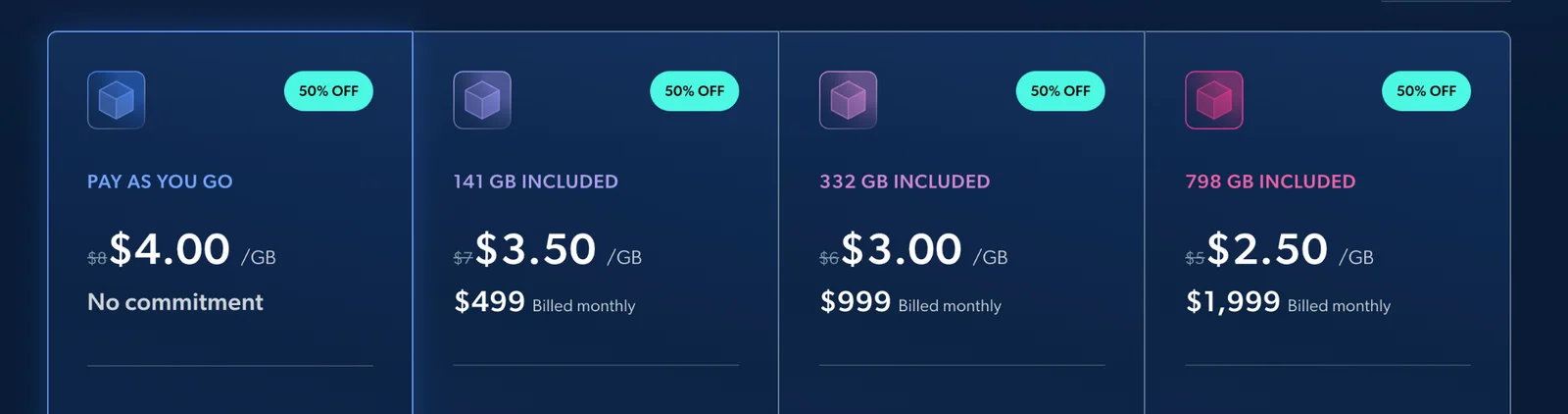
Pricing: At the time of verification, Bright Data shows a 50% promotional discount, so the page also shows prices from $4/GB PAYG and $2.50/GB on the largest standard plan. In our comparison, we use regular prices, not a temporary promotional rate.
Read our full Bright Data residential proxy review.
#3 Oxylabs — Best performance
Why it makes the list
- Pool size (claimed)
- 175M+ residential; 20M+ mobile; dedicated datacenter up to 1.9M IPs; ISP total not disclosed
- Residential price
- $6/GB ($2.50 at 1 TB+)
- Targeting
- Continent, country, state, city, ZIP, coordinates, ASN (free)
- Success rate
- 99.93% residential (global, Apr 2026)
Oxylabs stands out mainly for the performance and stability of the residential network. In the <a href="https://proxyway.com/reviews/oxylabs-proxies">Proxyway independent testing in 2026</a>, the provider showed a 99.93% average success rate and a 0.60s response time. Its residential pool has 175M+ IPs in 195+ countries, with support for precise geo-targeting and automatic rotation.
Pros
- High results in independent performance benchmarks
- Large residential pool and wide geographical coverage
- Accurate geo-targeting
- ISP proxies with self-service
- Well-developed infrastructure for enterprise workloads
- 24/7 support and additional tools for working with proxies
Cons
- Expensive, with a starting price of $6/GB
- Monthly plans; pay-as-you-go for residential is currently unavailable
- An enterprise-oriented approach means complex onboarding
A separate plus is the availability of ISP proxies on self-service: they start at $1.50 per IP per month on small plans and drop to $1.10 on larger ones.
Key features:
- 175M+ residential IPs in 195+ countries;
- 99.93% success rate and 0.60s response time in the global benchmark Proxyway 2026;
- Precise geo-targeting by country, city, state, ZIP code, ASN, and coordinates.
- Rotating and sticky sessions;
- SOCKS5;
- ISP proxies with self-service access;
- 24/7 support and dedicated account manager for relevant plans;
- ISO/IEC 27001:2022 for Oxylabs Certified Products.
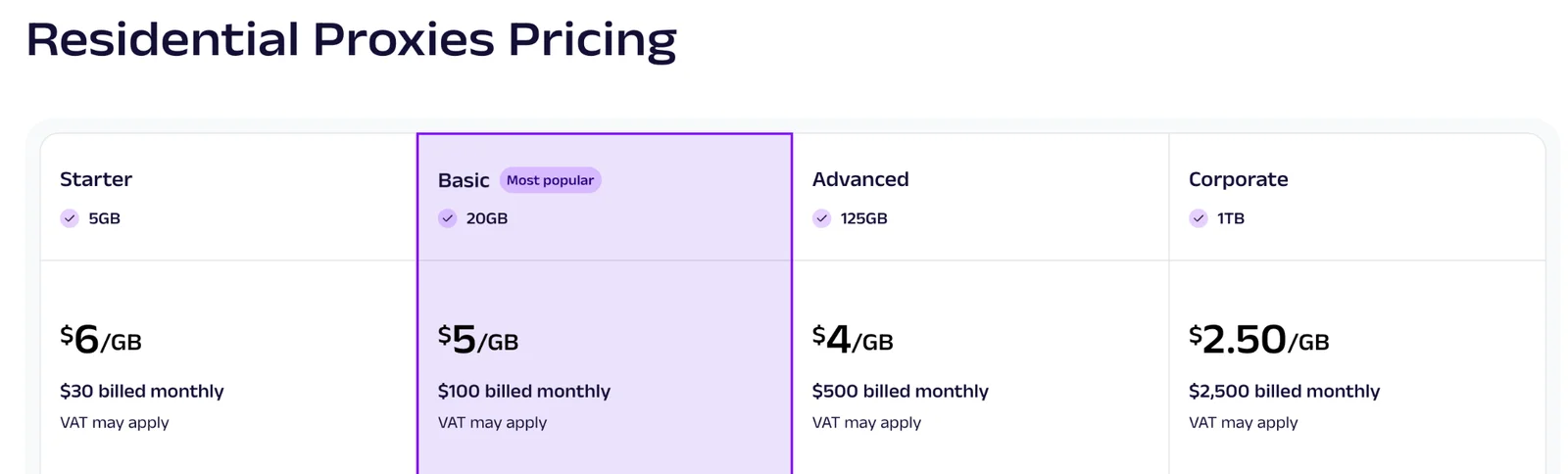
Pricing: monthly residential pricing starts at $30 for 5 GB ($6/GB). On 1TB plans, the price drops to $2.50 per GB.
Read our full Oxylabs residential proxy review.
#4 Decodo — Best value
Why it makes the list
- Pool size (claimed)
- 115M+ residential; 500K+ datacenter; 10M+ mobile; ISP pool not disclosed
- Residential price
- $3.75/GB ($2 at 1 TB)
- Targeting
- Country, city, ZIP, ASN
- Success rate
- 99.92% residential (global), 99.94% datacenter (US), Apr 2026
Decodo combines a competitive price, strong performance, and lots of features. It works for users looking for a balance between cost and quality of a residential proxy. Its network has 115M+ ethically sourced IPs in 195+ locations, with a reported 99.92% success rate, 0.53 s average response time, and 99.99% uptime.
Pros
- Strong price-performance ratio
- 115M+ IPs and 195+ locations
- High success rate and speed in independent benchmarks
- Advanced geo-targeting at no additional cost for basic parameters
- Flexible rotation control and sticky sessions
- Self-service onboarding and 24/7 support
- Free 3-day 100 MB trial and 14-day money-back guarantee for paid plans
Cons
- More expensive PAYG than large monthly plans: $4/GB vs. $2/GB on a plan with 1 TB
- Smaller residential pool than Oxylabs and Bright Data
Key features:
- 115M+ ethically sourced residential IPs in 195+ locations;
- 99.92% success rate and 0.53 s average response time, according to Proxyway data;
- 99.99% uptime according to the provider;
- Continent, country, state, city, ZIP code, and ASN/ISP targeting options;
- HTTP(S) and SOCKS5;
- 24/7 technical support and dashboard with usage statistics, costs, and proxy user settings;
- Integrations with Python Requests, Scrapy, Playwright, Puppeteer, Selenium;
- ISO/IEC 27001:2022 certification for proxy and scraping API products.
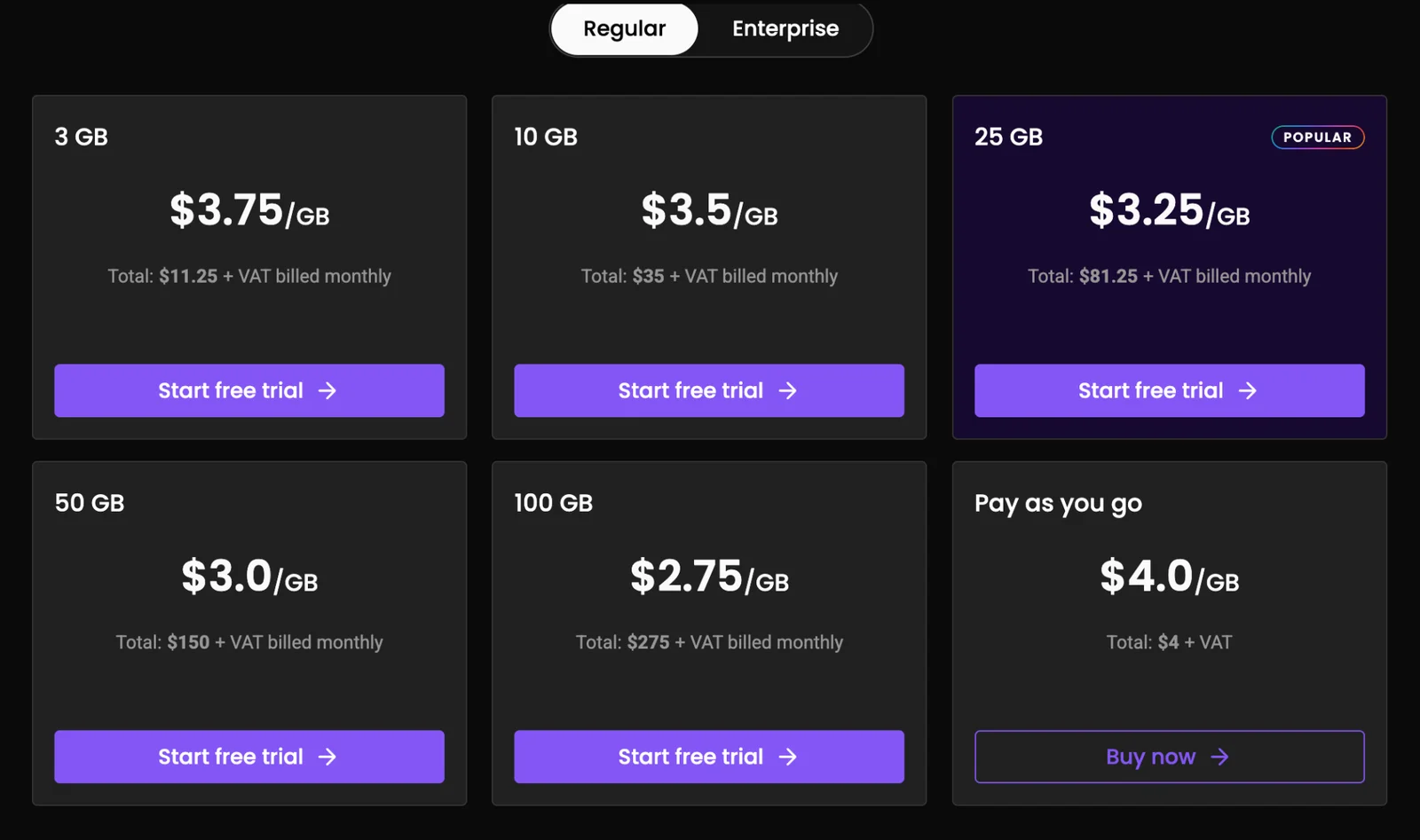
Pricing: Decodo offers both monthly plans and pay-as-you-go ($4/GB).
Read our full Decodo residential proxy review.
#5 Webshare — Best budget provider
Webshare
Budget, beginners, developers, datacenter / static tasks, small scaleWhy it makes the list
- Pool size (claimed)
- 80M+ residential; 400K+ datacenter; 100K+ static residential (ISP)
- Residential price
- $3.50/GB ($1.40 at 3 TB)
- Targeting
- Country, city, US state, US ZIP, ASN (residential); country only (datacenter / ISP)
- Success rate
- 99.28% residential (global), 99.93% datacenter (US)
Webshare features a low entry threshold and a free proxy testing rate. The Residential network has more than 80 million IP addresses in 195 countries, and targeting is possible by country, city, state, ZIP code, and ASN.
Pros
- Low starting price
- Free tariff for testing
- Simple self-adjustment
- Extensive coverage geography
- A wide selection of geotargeting parameters
- The price per GB decreases with increasing traffic volume
Cons
- The residential pool is smaller than that of the largest providers
- According to the results of <a href="https://proxyway.com/reviews/webshare-proxies">Proxyway independent testing</a>, Webshare is inferior to the fastest residential providers: the average response time in the Proxyway test was 0.86s, and the success rate was 99.28%
Webshare is a great option for small teams, developers, and users who care about a low starting price and simple connection.
Key features:
- 80+ million residential IP addresses in 195 countries;
- From $3.50/GB;
- Free 10 datacenter IPs and up to 1 GB of traffic per month, without a bank card;
- Targeting by country, city, state, ZIP code, and ASN;
- IP rotation after each request and sticky sessions;
- HTTP and SOCKS5;
- 99.97% uptime, according to Webshare;
- API and convenient control panel.
Pricing: monthly and yearly subscription plans.
Read our full Webshare proxy review.
Buying guide — how to choose
Before you buy residential proxies, determine your use case, how much traffic you will need, and how much your successful requests will cost, and only then compare providers according to additional features.
1. Determine the type of task
If you have to scrape data from websites with complex anti-bot systems, residential proxies usually make more sense because their IPs are linked to real user connections. For simpler tasks where blocking is not a problem, datacenter proxies can be sufficient and cheaper.
2. Estimate the required amount of traffic
The volume of GB per month is one of the main factors that shows the real cost of a proxy. Check if unused traffic burns or is rolled over to the next period, and how much the price per GB changes as the volume increases.
3. Choose how your IP rotates
Rotating proxies automatically change the IP at a specific interval or after each request. They are convenient for extensive data collection and tasks where you need to distribute requests between different IPs. Sticky proxies keep one IP address for a certain amount of time. They are better for scenarios where it’s important to keep a stable session between multiple requests.
4. Check geotargeting capabilities
If you need a specific geolocation, check what level of targeting is included in the base price. Country targeting is often available without a surcharge, while city, ZIP code, ASN, or other precise options may be paid options.
5. Pay attention to sourcing and compliance
Always check where the provider gets its IP addresses from and how it gets consent to use them. Also worth noting are the available certifications, privacy policies, and procedures for responding to abuse.
6. Calculate the cost of a successful request
A low price does not always mean a cheaper solution. If some requests end in a block or an error, you will have to spend more traffic on getting the same result.
Look how much one successful request actually costs. Test a small amount of traffic on the sites and geolocations you plan to work with, so you will see the real success rate, speed, and costs before increasing the budget.
What to avoid
Not all residential proxies are equally safe and reliable. Before connecting, check not only the price and number of IPs, but also their origin and terms of use.
Free public proxies. These proxies are one of the riskiest options. You don’t know who runs the server, who else uses its IP, and what’s going on with your traffic: such a proxy can be unstable, modify or block content, insert ads, or create risks to the data transmitted through it.
Providers with non-transparent IP origin. If the provider does not explain where it receives IP addresses and under what conditions it uses user connections, it is difficult to assess legal, reputational, and security risks. Look for providers that openly describe the IP engagement mechanism, consent, abuse policy, and procedures for removing IP from the network upon request.
Prices are too low without explanation. Abnormally cheap residential traffic without a clear explanation of its origin is a reason to check the provider more carefully.
FAQ
What is a residential proxy?
A residential proxy is a proxy that routes your traffic through an IP address associated with the user’s real home or mobile device. For a target website, such a request looks like a regular connection from a resident user, so such proxies are often used for web scraping, geotargeting, SEO, and advertising verification.
What are the best residential proxy providers in 2026?
It depends on the task, budget, and performance requirements. In our comparison, we look at DataImpulse, Bright Data, Oxylabs, Decodo, and Webshare, evaluating them on price, network quality, real performance, usability, and approach to sourcing and compliance.
How much do residential proxies cost?
The price depends on the provider, the volume of traffic, and the payment model. In 2026, residential proxies on major providers cost around $1 to $8 per GB.
Are residential proxies legal?
Yes, the use of a residential proxy is generally legal, but the legality of a particular activity depends on exactly how the proxies are used, what data is collected, and what laws are in place in the relevant jurisdiction. It is also important to check the origin of IP addresses.
Rotating vs static residential proxies — what's the difference?
Rotating residential proxies automatically change the IP address at a certain interval or after each request. Static residential proxies keep a single IP address during the session or the entire period of use.
Which residential proxy is cheapest?
DataImpulse offers the cheapest residential proxies in this comparison: $1/GB, and $0.80/GB for more than 1 TB, while Webshare drops to $1.50/GB for 1 TB. Look not only at the advertising price “from”, but also at the real price for the volume you need.
Do free residential proxies exist (and are they safe)?
Yes, free residential proxies exist, but you should use them very carefully. A free proxy service may have an opaque IP address origin, low stability, address sharing, or privacy risks.